
The Ultimate 2026 Website Audit Checklist: Is Your Site Ready?
Your website is your most important digital asset. It works around the clock — representing your brand, attracting new customers, and driving revenue. But when was the last time you gave it a thorough checkup?
Technology, search engine algorithms, and user expectations evolve fast. What worked in 2023 or 2024 may already be holding you back. A comprehensive website audit helps you identify what’s working, what’s broken, and where you’re leaving money on the table.
Whether you’re a small business owner in Indianapolis or managing a growing company anywhere in the U.S., this 2026 website audit checklist will walk you through everything you need to evaluate — and fix — to keep your website competitive this year.
Why a Website Audit Matters in 2026
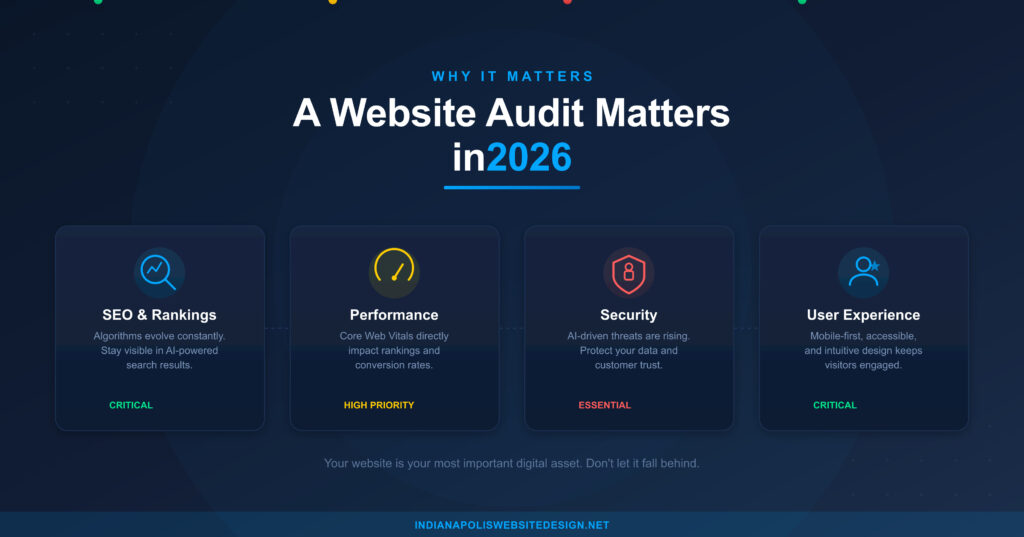
Think of a website audit like an annual physical for your business. It’s a structured review of your website’s health across performance, SEO, security, content, design, and user experience.
Here’s why it’s more important than ever heading into 2026. Search engines like Google continue to refine how they rank websites, with a growing emphasis on page experience signals, helpful content, and E-E-A-T (Experience, Expertise, Authoritativeness, and Trustworthiness). AI-powered search is changing how users find and interact with your content. Mobile traffic continues to dominate, and users expect lightning-fast, seamless experiences. Meanwhile, cyber threats are on the rise, making security non-negotiable for businesses of every size.
Skipping an audit means you could be losing traffic, leads, and customers without even realizing it.
Part 1: Performance & Speed Audit
Page speed directly impacts your search rankings, user experience, and conversion rates. Google has made it clear — slow websites lose.
What to check:
Run your site through Google PageSpeed Insights, GTmetrix, or Lighthouse. Look at your Core Web Vitals scores, specifically Largest Contentful Paint (LCP), Interaction to Next Paint (INP), and Cumulative Layout Shift (CLS). Evaluate image optimization — are you using modern formats like WebP or AVIF? Check whether browser caching and content delivery networks (CDNs) are properly configured. Review your hosting environment — is your server response time under 200ms? Minimize render-blocking JavaScript and CSS files.
2026 benchmark to aim for: Your LCP should be under 2.5 seconds, INP under 200 milliseconds, and CLS below 0.1. If you’re not hitting these numbers, it’s time to take action.
Part 2: SEO & Search Visibility Audit
If people can’t find you on Google, your website isn’t doing its job. SEO has evolved significantly, and your strategy needs to keep pace.
What to check:
Verify your site is fully indexed by reviewing Google Search Console for crawl errors, indexing issues, and manual actions. Audit your title tags and meta descriptions — every page should have a unique, keyword-rich title under 60 characters and a compelling meta description under 160 characters. Check for proper heading hierarchy (H1, H2, H3) on every page. Ensure your site has a clean XML sitemap and an optimized robots.txt file. Evaluate your internal linking structure to make sure search engines and users can easily navigate your content. Review your content for alignment with Google’s Helpful Content guidelines — is it written for humans first? Look at structured data markup (schema) to enhance your search result appearance with rich snippets. If you serve local customers, audit your Google Business Profile and ensure your NAP (Name, Address, Phone) is consistent everywhere online.
2026 consideration: With AI Overviews now a permanent fixture in Google search results, your content needs to be well-structured and authoritative enough to be referenced in AI-generated answers. Focus on clear, concise answers to common questions within your content.
Part 3: Mobile & Responsive Design Audit
Google uses mobile-first indexing, which means it primarily evaluates the mobile version of your site for ranking. If your mobile experience is poor, your entire SEO strategy suffers.
What to check:
Test your site on multiple devices and screen sizes using tools like Google’s Mobile-Friendly Test or BrowserStack. Ensure tap targets (buttons, links) are appropriately sized and spaced for touch interaction. Verify that text is readable without zooming. Check that pop-ups and interstitials don’t block content on mobile — Google penalizes intrusive interstitials. Make sure navigation is intuitive on smaller screens, with a clean mobile menu.
Pro tip: Don’t just shrink your desktop site. The best mobile experiences are thoughtfully designed to prioritize what mobile users need most.
Part 4: Security Audit
Website security isn’t optional — it’s a trust signal for both users and search engines. A single breach can destroy customer confidence and tank your rankings.
What to check:
Confirm your SSL certificate is active and your entire site loads over HTTPS. Ensure your CMS (WordPress, Shopify, etc.), themes, and plugins are all updated to the latest versions. Review user access — remove old accounts and enforce strong password policies. Check for malware or vulnerabilities using tools like Sucuri or Wordfence. Verify that automatic backups are running and that you can restore your site quickly if something goes wrong. If your site handles sensitive data, ensure compliance with relevant privacy regulations like GDPR, CCPA, or Indiana’s data privacy laws.
2026 consideration: AI-driven cyberattacks are becoming more sophisticated. Multi-factor authentication (MFA) for all admin accounts is no longer a luxury — it’s a necessity.
Part 5: Content & Messaging Audit
Content is still king, but only if it’s relevant, accurate, and aligned with what your audience actually needs.
What to check:
Review every page for outdated information — old team members, discontinued services, expired offers, and incorrect contact details. Evaluate your blog for thin, duplicate, or underperforming content. Consolidate or refresh older posts where possible. Ensure every key page has a clear, compelling call to action (CTA). Check that your brand voice and messaging are consistent across all pages. Look for content gaps — are there topics or questions your audience cares about that you haven’t addressed?
2026 consideration: AI-generated content is everywhere now, and audiences are getting better at recognizing it. Content that showcases genuine expertise, original insights, and a human voice will stand out and rank better.
Part 6: User Experience (UX) & Design Audit
First impressions happen in seconds. If your site looks dated or is hard to use, visitors will leave before they ever become customers.
What to check:
Evaluate your overall design — does it look modern and professional, or does it feel like it belongs in 2018? Check that your navigation is clear and logical, with important pages accessible within two or three clicks. Look at your forms — are they short, simple, and easy to complete on any device? Test your site’s accessibility against WCAG 2.2 guidelines. This includes proper alt text on images, keyboard navigation support, sufficient color contrast, and screen reader compatibility. Review your site for broken links, 404 errors, and orphaned pages.
2026 consideration: Website accessibility is not just good practice — it’s increasingly a legal requirement. The DOJ and courts continue to expand the scope of ADA compliance for websites. Prioritizing accessibility protects your business and serves all your customers better.
Part 7: Analytics & Conversion Tracking Audit
You can’t improve what you don’t measure. Your analytics setup needs to be accurate and actionable.
What to check:
Confirm Google Analytics 4 (GA4) is properly installed and tracking all relevant pages and events. Set up and review conversion goals — form submissions, phone calls, purchases, downloads, or whatever matters most to your business. Check that Google Search Console is connected and actively monitored. Review your traffic sources — where are your visitors coming from, and which channels are driving the most value? Make sure any paid advertising campaigns have proper tracking pixels and UTM parameters in place.
Pro tip: If you migrated from Universal Analytics to GA4 and haven’t revisited your setup since, now is the time. Many businesses have gaps in their tracking that are costing them valuable insights.
Free Printable Checklist Summary
Here’s a quick-reference version you can use to work through your audit:
Performance & Speed — Core Web Vitals passing, images optimized, fast hosting, minimal render-blocking resources.
SEO & Search Visibility — No indexing errors, optimized meta tags, clean sitemap, structured data, local SEO current.
Mobile & Responsive Design — Mobile-friendly on all devices, touch-friendly navigation, no intrusive pop-ups.
Security — SSL active, CMS and plugins updated, MFA enabled, backups running, malware scans clean.
Content & Messaging — All content accurate and current, strong CTAs, consistent brand voice, no content gaps.
UX & Design — Modern design, intuitive navigation, accessible (WCAG 2.2), no broken links.
Analytics & Tracking — GA4 installed, conversion goals set, Search Console connected, traffic sources reviewed.
Don’t Have Time to Audit Your Own Website?
We get it — running a business keeps you busy. If working through this checklist feels overwhelming, that’s exactly why we’re here.
At Indianapolis Website Design, we offer comprehensive website audits that go deep into your site’s performance, SEO, security, and user experience. We don’t just identify the problems — we fix them, so your website works harder for your business in 2026 and beyond.